

STUDIO
Designing Better Protection Order Pathways
Lessons from Indiana’s CPO Portal Evaluation and Redesign
submitted by Sarah Mauet & Cheenar Shah
Executive Summary
When survivors of domestic violence seek civil protection orders, they may be navigating unfamiliar legal procedures while experiencing fear, safety risks, and acute stress. Visiting a courthouse to file a petition can present barriers, so courts across the United States are investing in digital self-help tools. Yet, technical functionality does not necessarily translate into usability, particularly for petitioners in crisis.
In 2019, the Indiana Supreme Court launched one of the nation’s first civil protection order (CPO) online filing portals. By 2024, court partners had received reports that self-represented petitioners were struggling to use the online portal, but the court lacked systematic evidence about the causes. Innovation for Justice (i4J), a virtual social justice innovation lab housed at both the University of Arizona James E. Rogers College of Law and the University of Utah David Eccles School of Business, partnered with the Indiana Supreme Court to evaluate the existing portal and develop evidence-based recommendations for improving usability, access, and safety. The work was part of Ensuring Safety and Access in Virtual Civil Protection Order Processes, a broader initiative led by the National Center for State Courts and supported by the U.S. Department of Justice’s Office on Violence Against Women.
Over five months, i4J conducted landscape research, expert reviews, interviews with court system actors and community members, moderated usability testing, and designed and tested iterative prototypes. Expert reviews and interviews surfaced an insight that the portal, legal process, and support services need to be more trauma-informed in order to reduce the retraumatization that often occurs during the CPO process. To reduce the risk of causing retraumatization during the research process itself, the team made a deliberate, trauma-informed choice to recruit domestic violence advocates and attorneys with experience working with many survivors as proxy participants, rather than evaluating the existing portal directly with survivors. These professionals’ extensive experience working with survivors through the legal process positioned them as valuable participants and substantially reduced the risk of retraumatizing survivors. The findings describe how participants performed and responded under the study’s testing conditions. Asked after the usability test if the existing portal was trauma-informed, participants gave it a score of 2.6 out of 7 possible points. That finding led the research team to two conclusions: (1) to work with proxy participants to focus on the iterative design of a prototype that was less likely to cause retraumatization and (2) to recommend that the court test and iteratively redesign that prototype with survivors prior to implementation.
The evaluation and iterative redesign also identified opportunities to improve safety guidance, legal information, registration, incident documentation, requested relief, and filing-location decisions. Prototype testing with proxy participants documented improvements in several usability measures, while also identifying areas requiring further refinement. The project produced an interactive prototype and a set of recommendations for the Indiana courts. It also offers a research approach that other courts can adapt, provided that subsequent testing with affected users prior to implementation and continuous improvement after implementation remain integral to the process.
[1] Supreme Court Announces Protection Order E-Filing Service, Ind. Law. (Oct. 1, 2019), https://www.theindianalawyer.com/articles/supreme-court-announces-protection-order-e-filing-service.
[2] Sarah Mauet & Cheenar Shah, UX Evaluation Report: Indiana Civil Protection Order Portal, (Sep. 22, 2025), http://dx.doi.org/10.2139/ssrn.6720658.
Domestic violence affects an estimated 10 million people annually in the United States. Low-income survivors of domestic violence also face substantial unmet civil legal needs; according to the Legal Services Corporation’s 2022 Justice Gap Report, 98% will experience a civil legal issue this year and 88% will receive inadequate or no legal help. Seeking a CPO can be a critical step toward safety, yet many survivors must navigate complex forms, unfamiliar legal language, and processes designed for legal professionals all without the assistance of legal professionals.
The stakes are considerable. Petitioners may experience fear, trauma, and acute stress while also facing constraints related to time, privacy, and access to a computer or smartphone. A CPO portal must therefore do more than collect information for the court; it should communicate clearly, support informed decisions, and help petitioners recognize and manage risks throughout the process, while minimizing additional stress and the potential for retraumatization.
By 2023, 40% of the 39,000 annual CPO petitions filed in Indiana were submitted through the online portal. But usage volume alone doesn’t reveal whether self-represented petitioners could use the system effectively. Reports of difficulty from court partners prompted the Indiana Supreme Court to partner with i4J on a human-centered evaluation guided by the question: How might we make filing a civil protection order online more trauma-informed and easier to access and use for domestic violence survivors in Indiana?
[3] This choice is further supported by research suggesting that approximately 50% of advocates themselves have lived experience with domestic violence.Harriet Bromley et al., The Professional Quality of Life of Domestic and Sexual Violence Advocates: A Systematic Review of Possible Risk and Protective Factors, Trauma, Violence & Abuse, 25 Trauma, Violence & Abuse 1113, 1116 (2024), https://pmc.ncbi.nlm.nih.gov/articles/PMC10913293/. For more information on how court processes retraumatize survivors, see Negar Katirai, Retraumatized in Court, 62 Ariz. L. Rev. 81 (2020), https://arizonalawreview.org/pdf/62-1/62arizlrev81.pdf.
[4] Martin R. Huecker et al., Domestic Violence, in StatPearls (StatPearls Publ’g, updated Apr. 9, 2023), https://www.ncbi.nlm.nih.gov/books/NBK499891/.
[5] Snapshot of Key Findings for: Recent Survivors of Domestic Violence, Legal Servs. Corp. (Apr. 2022), https://lsc-live.app.box.com/s/wiklly0wcncark6yfgd8gjeh7pj55hpq.
[6] Statistic shared by court partners.
Under the guidance of experienced UX and design researchers and educators, students enrolled in i4J’s UX4Justice course applied design thinking, systems thinking, and UX research methods across three phases. Each phase built on the last, moving from understanding the landscape, to evaluating the existing portal, to designing and testing prototypes.
PHASE 1: Understand
Expert review + system actor interviews
PHASE 2: Evaluate
Moderated usability testing of the existing portal
PHASE 3: Design & Test
Iterative prototype design and testing
Phase 1: Understanding the Landscape
The team began by examining domestic violence, access to justice, Indiana’s protection order process, comparable filing portals, and the state’s survivor-support ecosystem. It then conducted two forms of expert review.
Cognitive walkthroughs: Experienced UX and design researchers examined how someone unfamiliar with the process might navigate the portal on a mobile device. Researchers reviewed safety features, sought help resources, and attempted to complete a petition. The walkthroughs suggested that relevant information was available but could be difficult to locate, interpret, and use, particularly for people in crisis.
▶ Key Insight: While the existing portal contains or links to correct information, users must work hard to find it, understand it, and act on it, especially while under stress.
Heuristic evaluations: Experienced UX and design researchers assessed the portal against Jakob Nielsen’s Ten Usability Heuristics and the Substance Abuse and Mental Health Services Administration’s six principles of trauma-informed care. This combined lens helped researchers identify problems involving both interface usability and trauma-informed technology design.
▶ Key Insight: The existing portal functions as a legal filing tool, but many interactions could better support survivor safety, confidence, comprehension, and informed decision-making.
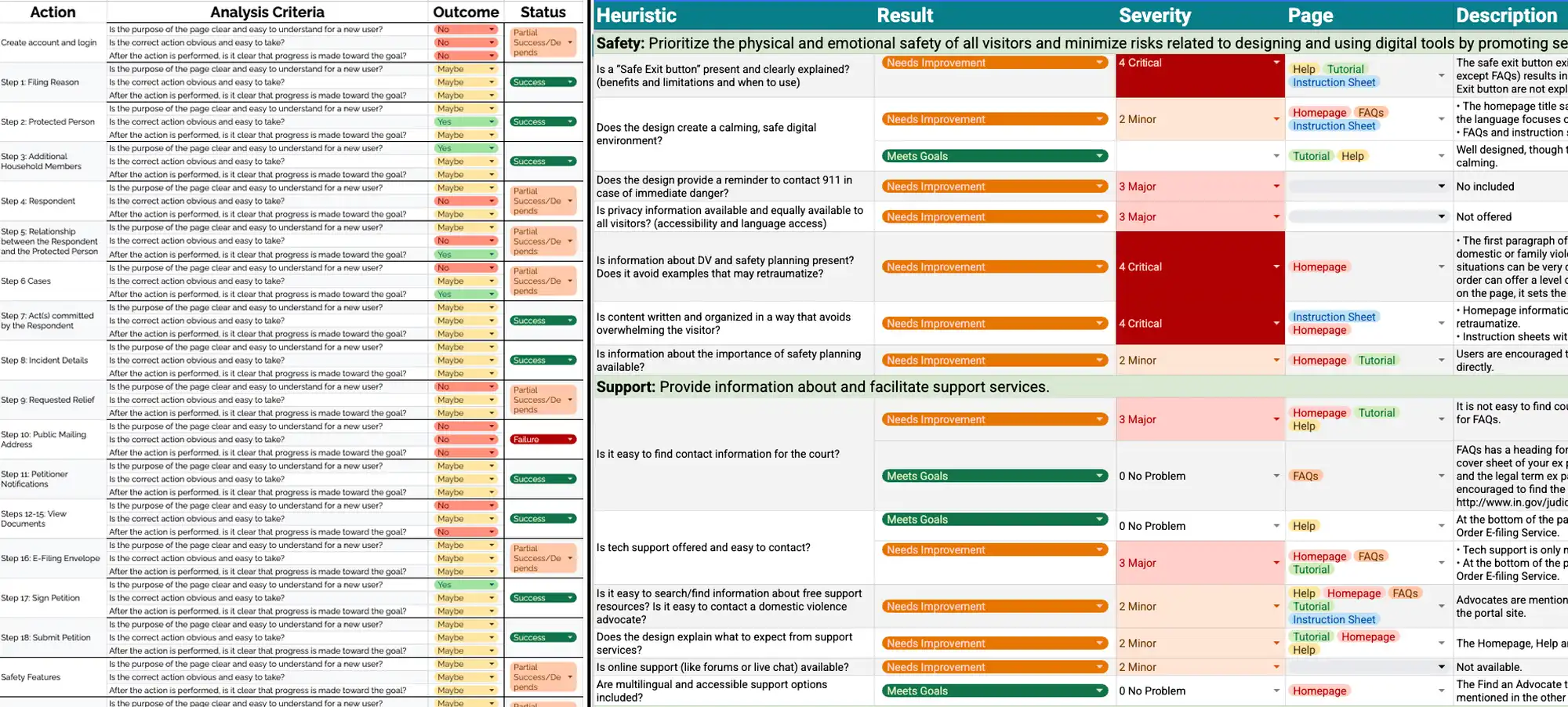
Figure 1: Examples of expert review data
Left is an example of the cognitive walkthrough data, and on the right is an example of the heuristic evaluation data. The purpose of this image is to provide an example of what the data analysis for these expert methods looks like. The text is intentionally illegible in these screenshots because they are real data.
Interviews: The team conducted semi-structured interviews with 25 Indiana system actors, including judges, court staff, portal technologists and help-desk staff, attorneys, law enforcement, domestic-violence advocates, and survivor-support organization leaders. Affinity diagramming revealed patterns of needs:
- Clearer guidance. Participants described petitioners struggling to understand eligibility, forms, and procedural requirements. Advocates and court staff frequently provided explanations that the portal itself was not sufficiently accessible or usable.
“There are things that are necessary for a protection order to be granted that are not apparent in the portal.” – Participant 11, Support Organization Leadership
“All these forms are in legalese…. It’s overwhelming already, and then to look at it and not understand it, most of them are just like, forget it.” – Participant 6, Court Staff
- Privacy and safety. Participants questioned whether petitioners understood what information would become part of the court record, what would be disclosed to the respondent, and which privacy protections were available.
“I don’t think [survivors] always realize whatever they put in that petition would also be filed and then served on the other party.” – Participant 23, Attorney
“They have concerns about if their privacy is being respected, where their information is going, or how many people it’s going to.” – Participant 24, Advocate
- Process transparency. Participants emphasized the importance of explaining what happens after submission, including hearings, notifications, and other procedural steps.
“You’ve submitted something to the court. Now there’s all of these potential unknowns.” – Participant 4, Support Organization Leadership
“Giving people a heads up on what to expect is a huge deal. It removes a lot of anxiety for people.” – Participant 20, Support Organization Leadership
- Help resources. Participants reported difficulty locating existing resources and a need for more help resources.
“Other than calling us, no [there are no help resources]. – Participant 4, Support Organization Leadership
“[Survivors need] some sort of informational guide, something that will educate them on the matter.” – Participant 10, Advocate
- Usability. Participants reported usability concerns, particularly that important information could be difficult to see or navigate on smaller screens.
“I find it [the Portal] very not-user-friendly.” – Participant 15, Advocate
“On a phone it’s even smaller, and so they don’t see some of the things we see automatically because we see it on a full screen.” – Participant 14, Court Staff
- Trauma-informed communication. Participants called for clearer language, accessible support, and an experience that recognizes the emotional demands of seeking a protection order.
“We can put all the information in the world out on the page, and [it’s not necessarily] going to compute because they’re in a trauma space, and that just isn’t possible.” – Participant 11, Support Organization Leadership
“Trauma-informed is the goal.” – Participant 23, Attorney
Together, these findings suggested that the portal placed substantial responsibility on petitioners to locate information, interpret legal concepts, follow procedural next steps, and anticipate consequences.
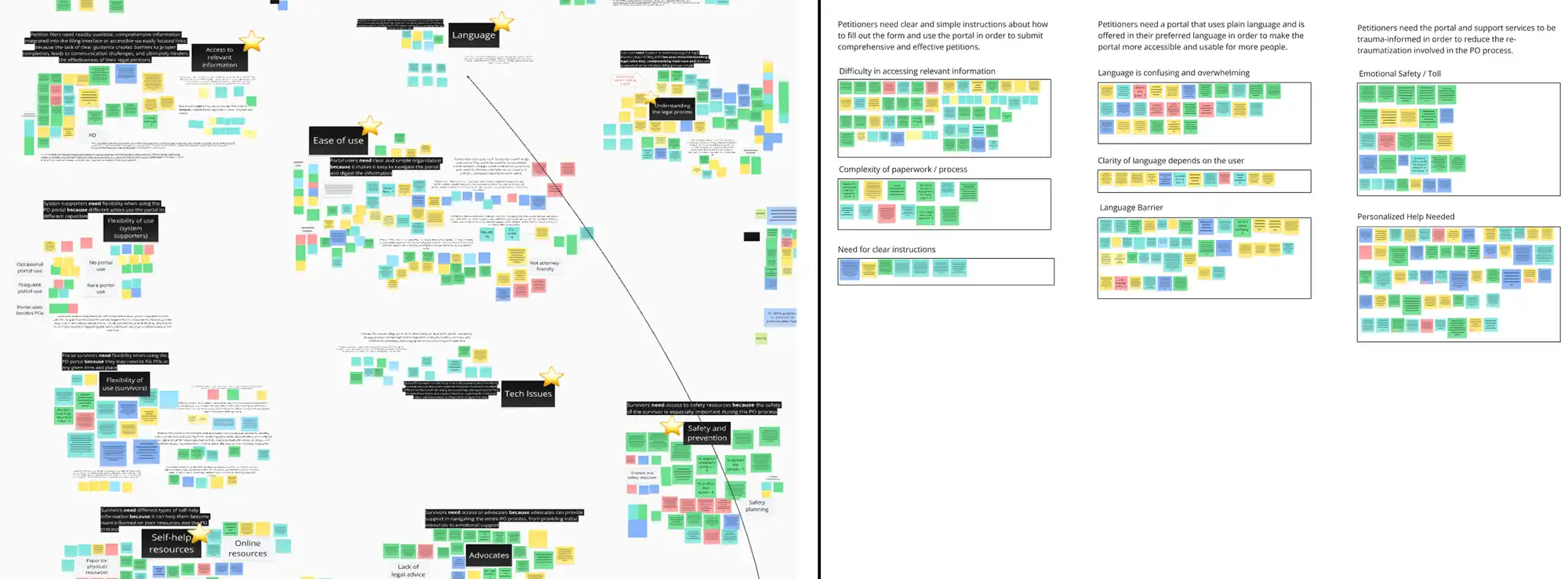
Figure 2: Examples of interview data analysis
Example of what interview data look like in Miro after analysis. The text is intentionally illegible in these screenshots because they are real quotes. The purpose of this image is to provide an example of what it looks like once themes and insights have been identified.
Phase 2: Evaluating the Existing Portal
The interviews informed behavioral research questions and a structured usability-testing protocol to surface insights about the following:
- Do users understand the safety features of the portal?
- Can users quickly and easily register with the portal?
- Can users easily select the correct county and court?
- Can users find and use the help resources to select the correct reason for filing?
- Can users accurately complete the relationship section?
- Can users document an effective narrative using the instructions provided?
- Can users identify when a hearing is required?
Rather than recruit survivors for this early stage to navigate a potentially retraumatizing experience before any improvements were made, the team made a deliberate, trauma-informed choice to recruit five domestic violence advocates and attorneys with professional experience assisting survivors in Indiana as proxy participants. In qualitative usability testing, five representative users can uncover almost as many usability problems as many more test participants, and iterative testing can uncover virtually all usability issues in a design.
Participants completed seven tasks during moderated remote sessions, sharing their screens and describing their decisions aloud. Researchers documented task completion, navigation paths, and perceived ease of use. After each activity, participants were asked a post-task Ease of Use question: On a seven point scale, overall, how difficult or easy was this activity to complete? (1 = Very Difficult | 7 = Very Easy). Participants also answered general post-test questions. The testing identified several problems:
- Registration is confusing. Registration was often completed successfully but was described as confusing, particularly because of account-creation steps and temporary passwords.
- Help resources were effectively invisible. None of the participants successfully completed the task of finding and using support resources to determine the correct filing reason because information was scattered across multiple pages and windows and was not offered in plain language.
- Critical procedural information was easy to miss. Only one participant successfully identified when a court hearing would be required, which raised concerns about whether petitioners could identify the hearing requirement.
- Professional experience masked the portal’s real barriers. Professional expertise helped participants navigate difficulties that they believed would be more challenging for self-represented petitioners. The portal was functional for those who already understood the legal system; it was a barrier for those who didn’t.
▶ Key Insight: Participants could generally complete straightforward tasks, but tasks requiring interpretation of legal concepts, navigation of support resources, or understanding of court procedures were significantly more challenging, demonstrating that the portal is technically functional but often requires a prior understanding of complex legal concepts, procedural decisions, and support resources that many self-represented petitioners lack.
Phase 3: Iterative Prototype Design and Testing
The team translated research findings into design opportunities, which court partners reviewed and prioritized. Some recommendations involved longer-term infrastructure changes; others could be explored through interface redesign.
The first prototype underwent expert review addressing plain language, language access, and accessibility considerations. Eight proxy participants then completed the first prototype-testing round. Feedback informed a second prototype, tested with seven new participants. The team subsequently incorporated findings from both rounds into a final design, Prototype 3, which was delivered to the courts with recommendations to conduct iterative testing with survivors prior to implementation.
▶ Key Insight: Rather than relying on expert review and general best practices regarding what might improve the user experience, proposed changes were reviewed and evaluated by court system actors and proxy participants several times, allowing the team to test solutions and integrate feedback before presenting the court with recommendations for next steps.
[7] Jakob Nielson, Why You Only Need to Test with 5 Users, NN Grp. (Mar. 18, 2000), https://www.nngroup.com/articles/why-you-only-need-to-test-with-5-users/.
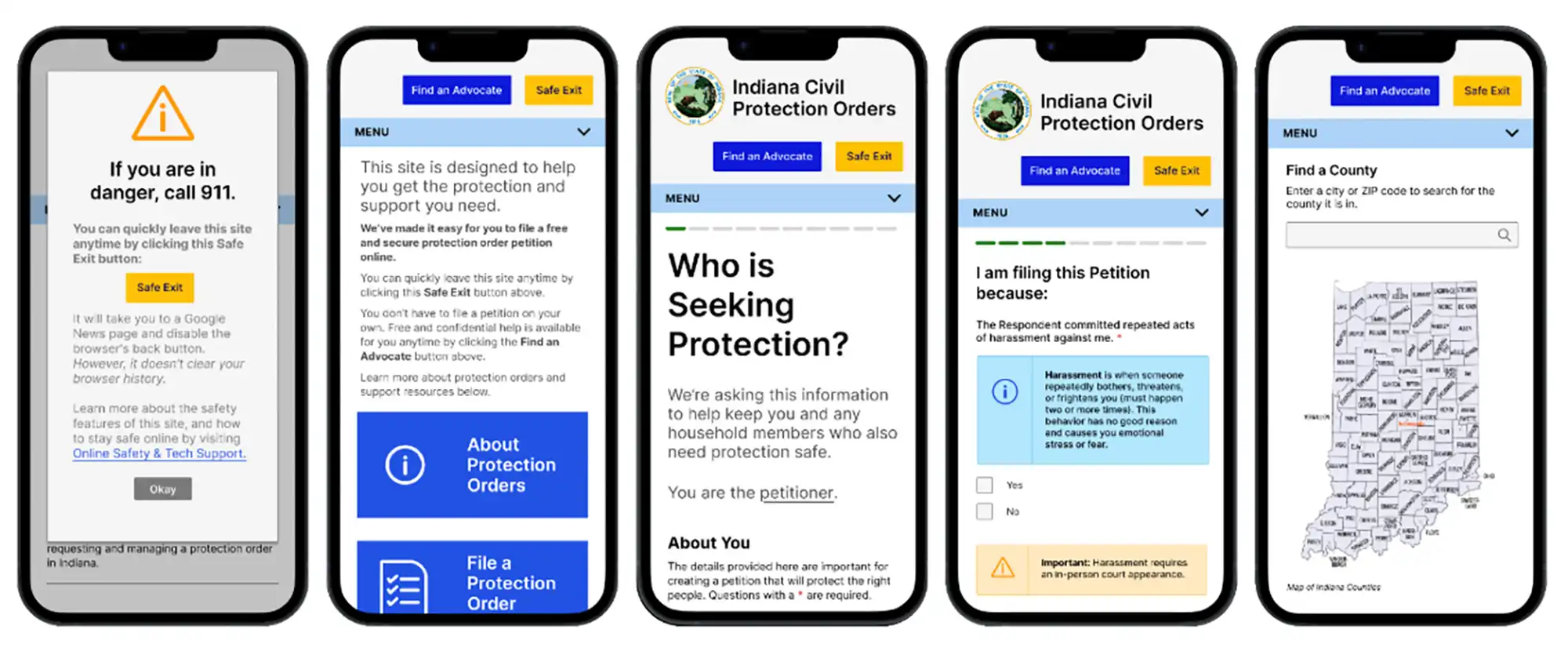
Figure 3: Examples from Prototype 3.
A selection of screenshots from Prototype 3.
The evaluation identified opportunities to improve the Indiana Civil Protection Order portal across seven areas of the filing experience. The table summarizes the identified barriers, proposed responses, and design objectives. Four interventions are examined in greater detail below to illustrate how iterative design research findings shaped the prototype and its subsequent refinement.
Overview of Proposed Design Interventions
| Intervention | Identified barrier | Prototype response | Design objective |
| Safety features and resources | Safety information and support were not consistently prominent or easy to access. | Entry warning, consolidated online safety guidance, and persistent Safe Exit and Find an Advocate buttons. | Make safety information and support easier to find, understand, and use. |
| Help resources and legal definitions | Legal definitions and information were difficult to find and interpret. | About Protection Orders page, plain-language definitions, and contextual help. | Support comprehension and informed filing decisions. |
| Account registration | Account creation, account types, and password-related challenges made registration confusing. | Get Started pathway, simplified registration, and clearer account options. | Reduce barriers to beginning a petition. |
| Relationship and filing-reason selection | Legal categories and eligibility-related choices were difficult to interpret. | Clearer terminology, contextual explanations, and revised question flow. | Reduce confusion around consequential choices. |
| Incident documentation | Open-ended narrative fields offered limited guidance. | Structured prompts, clearer instructions, and reassurance about uncertain details. | Make incident-description instructions easier to understand. |
| Requested relief | Relief options and hearing requirements were difficult to understand and distinguish. | Reorganized choices, clearer procedural categories, and plain-language guidance. | Clarify available remedies and requirements. |
| Filing-location selection | County selection involved unfamiliar rules and failed to make practical and safety considerations clear. | Contextual guidance, interactive map, search, travel information, and revised sequencing. | Support informed filing-location decisions. |
3.1 Making Help and Legal Definitions Easier to Find
The existing portal contained legal definitions and support resources, but participants struggled to locate and use them when making filing decisions. None of the five initial participants completed the activity involving definitions of domestic or family violence, sexual offenses, stalking, and harassment. Information was distributed across pages and windows, requiring users to interrupt their progress to find guidance.
The team introduced an About Protection Orders page with more accessible explanations of qualifying conduct and relationships. Legal definitions and support resources were also made easier to access from relevant points in the filing process. Subsequent refinements improved the presentation and clarity of this information.
“I think the verbiage for the definitions are concise, and it uses words that I believe the most of our client population would understand.” – Participant 36.
“I think it [the blue definition box] is a great way.” – Participant 41.
Information is not useful simply because it exists somewhere in a legal system. Guidance should be understandable, discoverable, and available when users must make a decision. Contextual guidance can reduce the burden on users to locate and interpret legal information independently, particularly when the consequences of misunderstanding a question may be significant.
Existing Portal
Figure 4: Making Help and Legal Definitions Easier to Find
Help information is housed on a separate page, requiring users to leave the filing process to find it.
Prototype 3
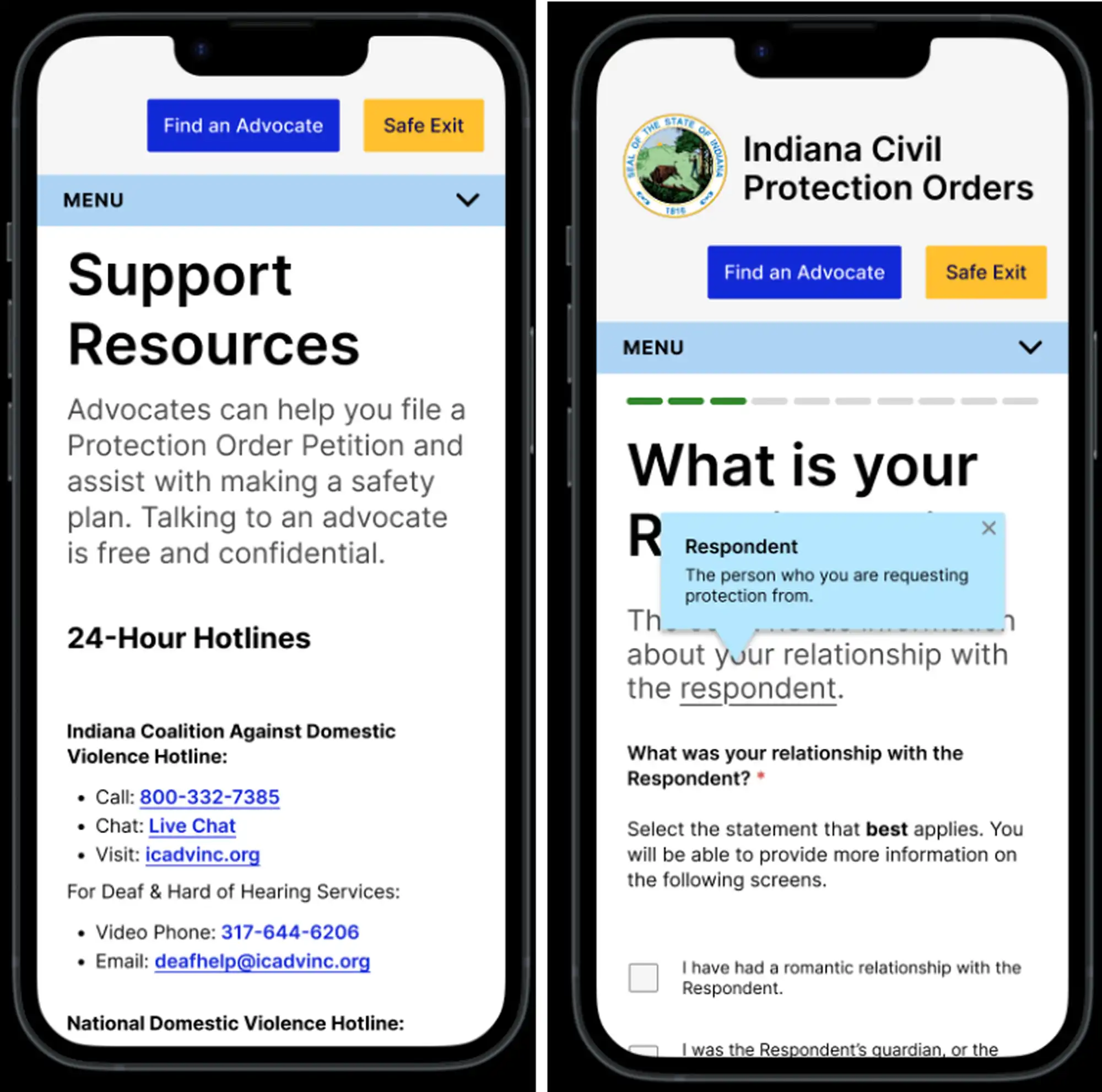
Hotline information and legal definitions are integrated into the filing process so users can access help without leaving the CPO portal.
3.2 Simplifying Registration
Registration introduced friction before petitioners could begin filing. Although most initial participants completed the assigned activity, they described account creation as confusing and time-consuming. System actors also reported difficulties involving registration links, temporary passwords, and email access.
The prototype introduced a Get Started pathway explaining the filing process and available support. Registration was simplified, with clearer distinctions between personal and professional accounts, fewer requested details, and a more straightforward password process. After the first testing round, the team reorganized introductory information into expandable sections and made the returning-user login pathway more visible.
“I thought it [the Get Started page] was good. It was simple, and it kind of broke it down into those steps of what you need before getting a protection order, seemed easy to access and easy to navigate.” – Participant 48.
“I like the drop downs. I like all the links inside of it. It’s clear and concise.” – Participant 45.
Early procedural barriers can undermine a user’s ability to continue, even when a task is technically achievable. Registration illustrates why task completion must be considered alongside perceived difficulty.
Existing Portal
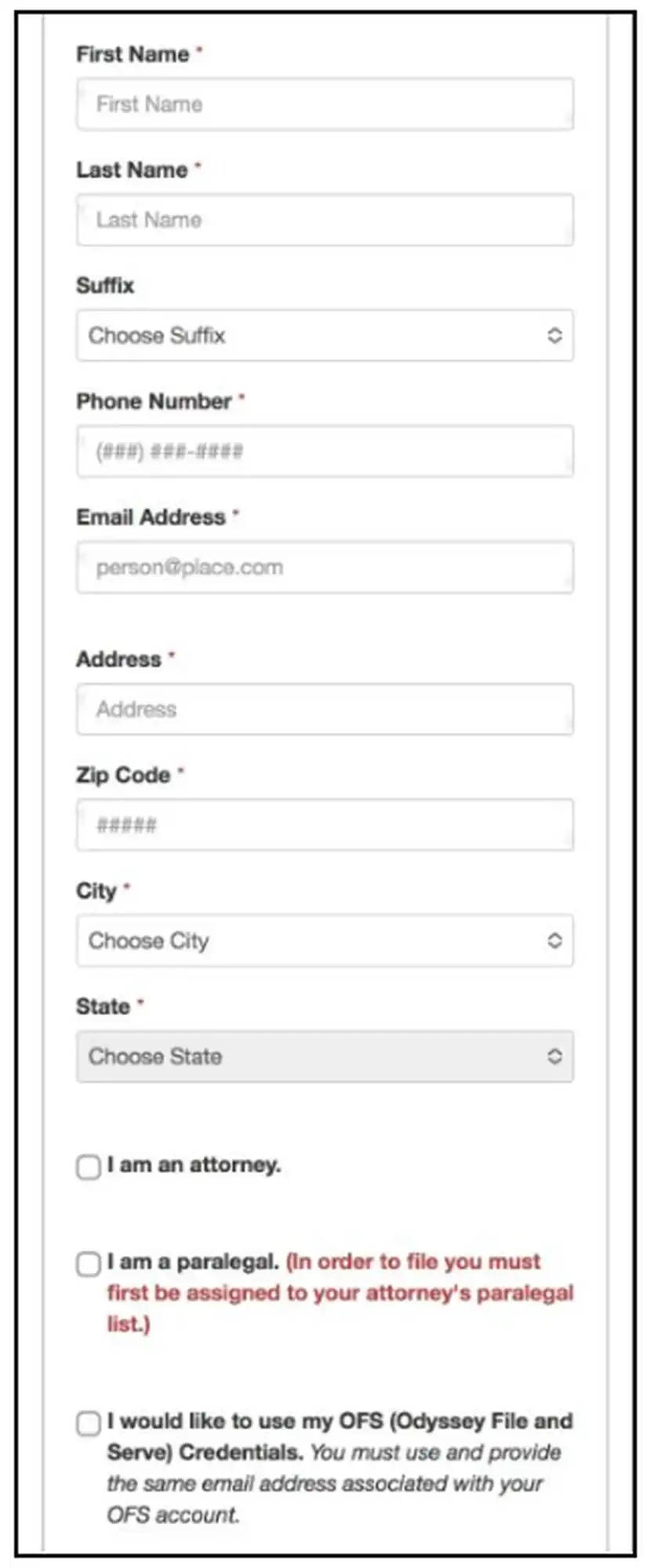
Figure 5: Simplifying Registration
Registration requires multiple steps and fields, creating early friction before a petitioner can begin filing.
Prototype 3
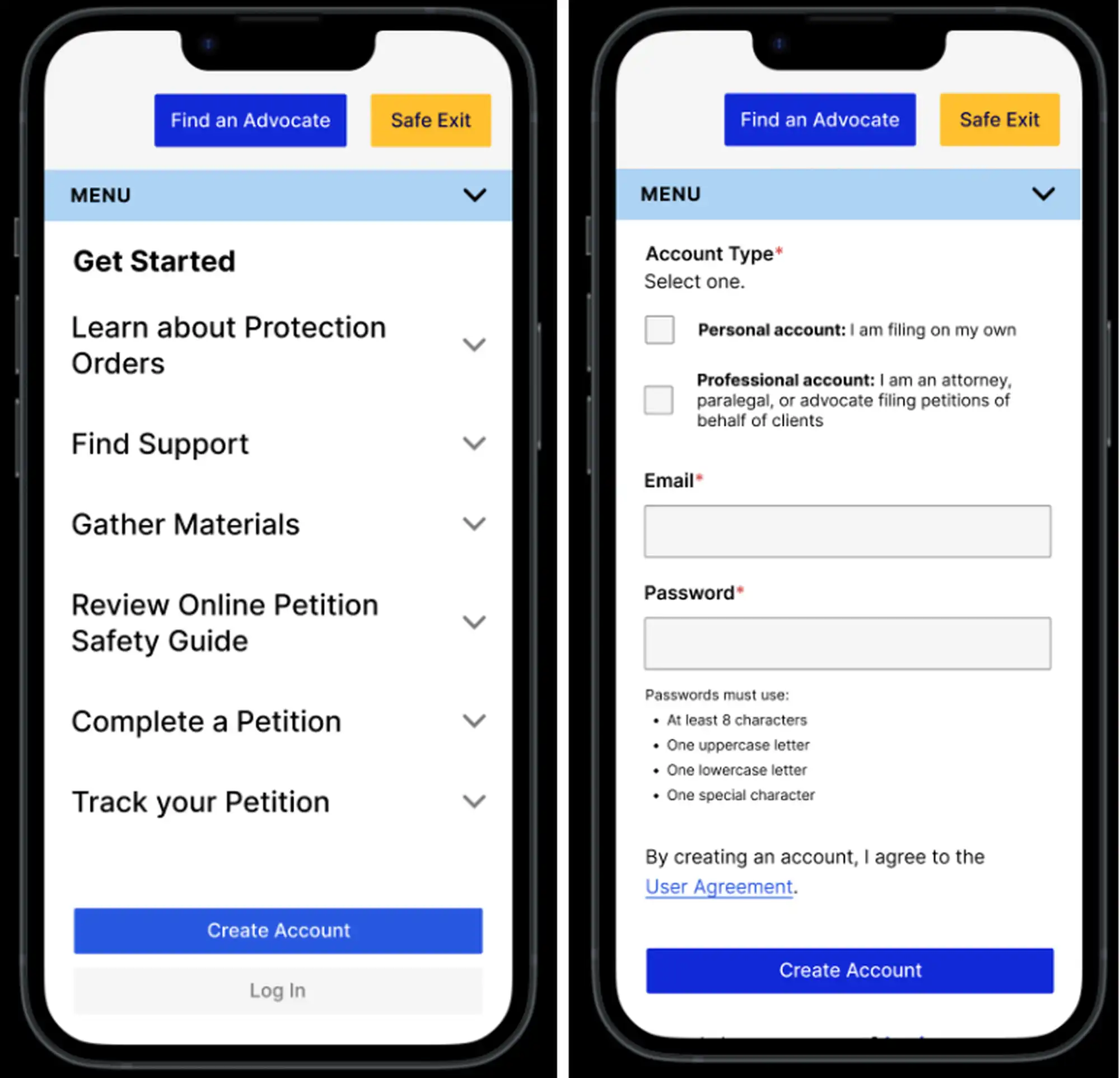
A “Get Started” pathway and streamlined registration reduces required fields and sets clearer expectations about account setup.
3.3 Guiding Incident Documentation
The existing portal asked petitioners to describe incidents in an open-text field with limited guidance. Although all baseline participants completed the assigned instructional task, their feedback suggested that the instructions could be clearer. Petitioners may be uncertain about which details matter or how to proceed when dates and other information are incomplete.
The prototype introduced structured prompts addressing dates, actions, statements, witnesses, and supporting materials. It also used reassuring language acknowledging uncertainty about details. Later feedback prompted further clarification that supporting evidence was not required to file, that witness-related language should be more understandable, and that descriptions should accommodate threatening conduct without physical violence.
“Because it is succinct and quick. I like that. The date says ‘it’s okay if you’re unsure the exact day, just make your best guess.’ And the questions asked are actually really on point.” – Participant 45
“I will say that when it asks about what happened, I love that it says ‘what actions were done’ and ‘what words were said.’” – Participant 43
Structured guidance can make open-ended legal questions easier to interpret without prescribing what petitioners should say.
Existing Portal
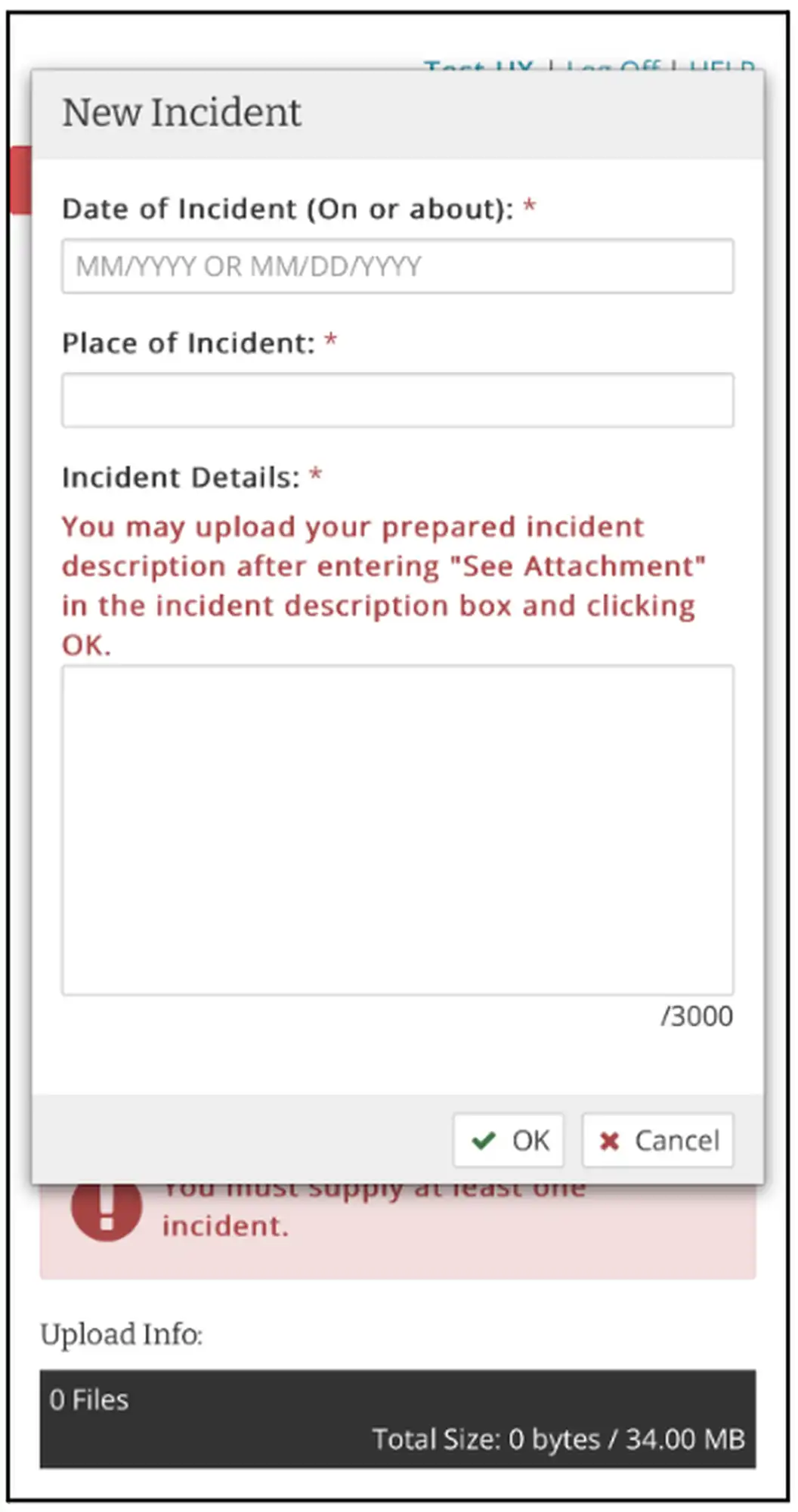
Figure 6: Guiding Incident Documentation
An open text box with minimal guidance asks petitioners to describe incidents without structure or prompting.
Prototype 3
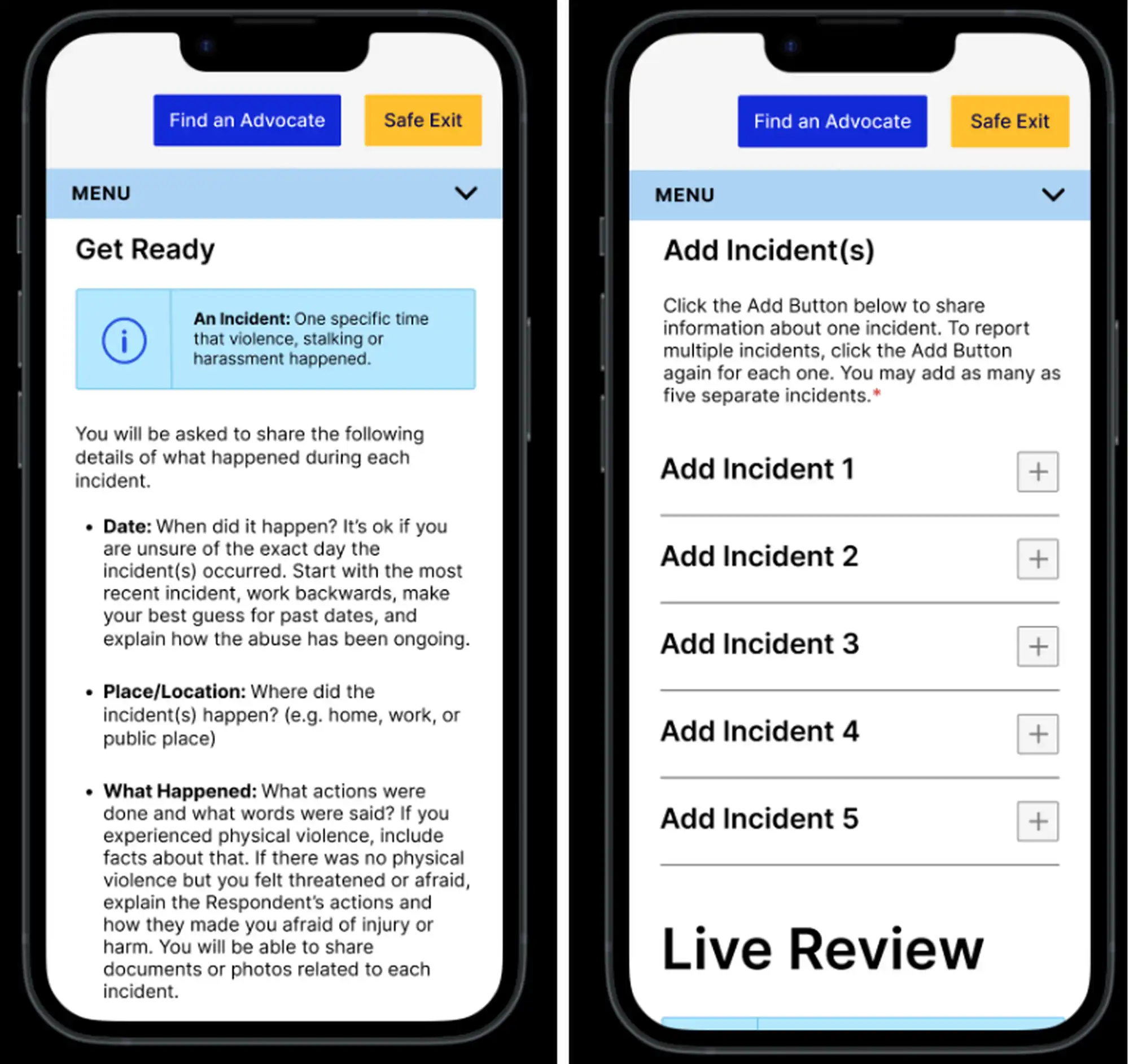
Structured prompts and step-by-step guidance including explicit reassurance about imperfect information are intended to help petitioners provide more complete incident descriptions.
3.4 Clarifying Requested Relief and Firearms-Related Decisions
Initially, the requested-relief section required users to interpret legally consequential options and procedural requirements. Only one of five participants in the evaluation completed the assigned activity involving firearm removal and the associated hearing requirement.
The prototype reorganized relief options according to procedural requirements and introduced clearer headings and explanations, including a definition of “relief.” Following the first testing round, the team refined category descriptions, hearing-related language, and firearms instructions, including clarification that certain weapon details were optional.
“I like how it’s organized and clearly labeled [with] this activity will require this [and] when it would happen.” – Participant 39
“It is straightforward, and it is all sectioned off with ‘immediately,’ ‘within 30 days,’ ‘with a full court hearing.’ I like that a lot.” – Participant 49
Interface design can clarify legal requirements but cannot eliminate their underlying complexity. Although prototype participants performed better on the assigned task, remaining difficulties reinforced the need for further testing.
Existing Portal
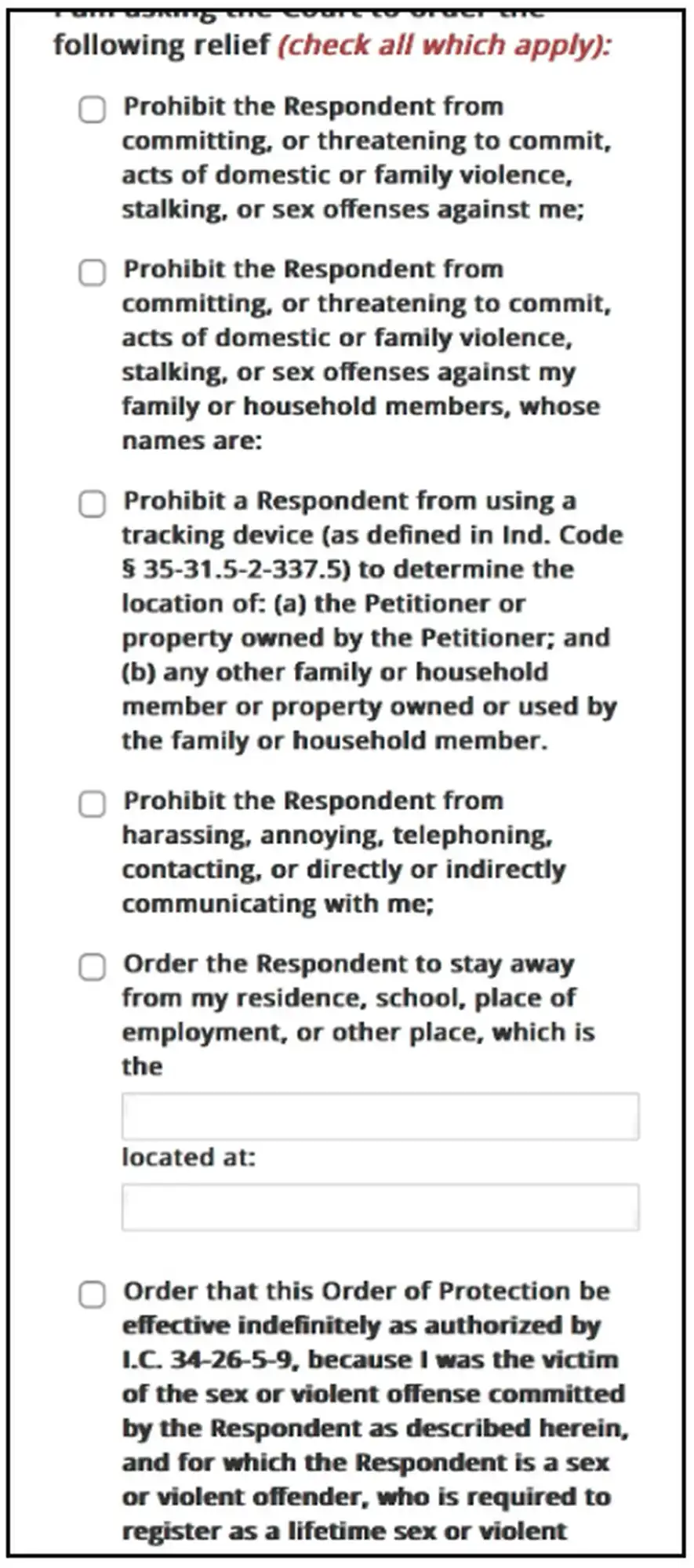
Figure 7: Clarifying Requested Relief and Firearms-Related Decisions
Relief options are listed without context, leaving users unclear about what each option means or requires.
Prototype 3
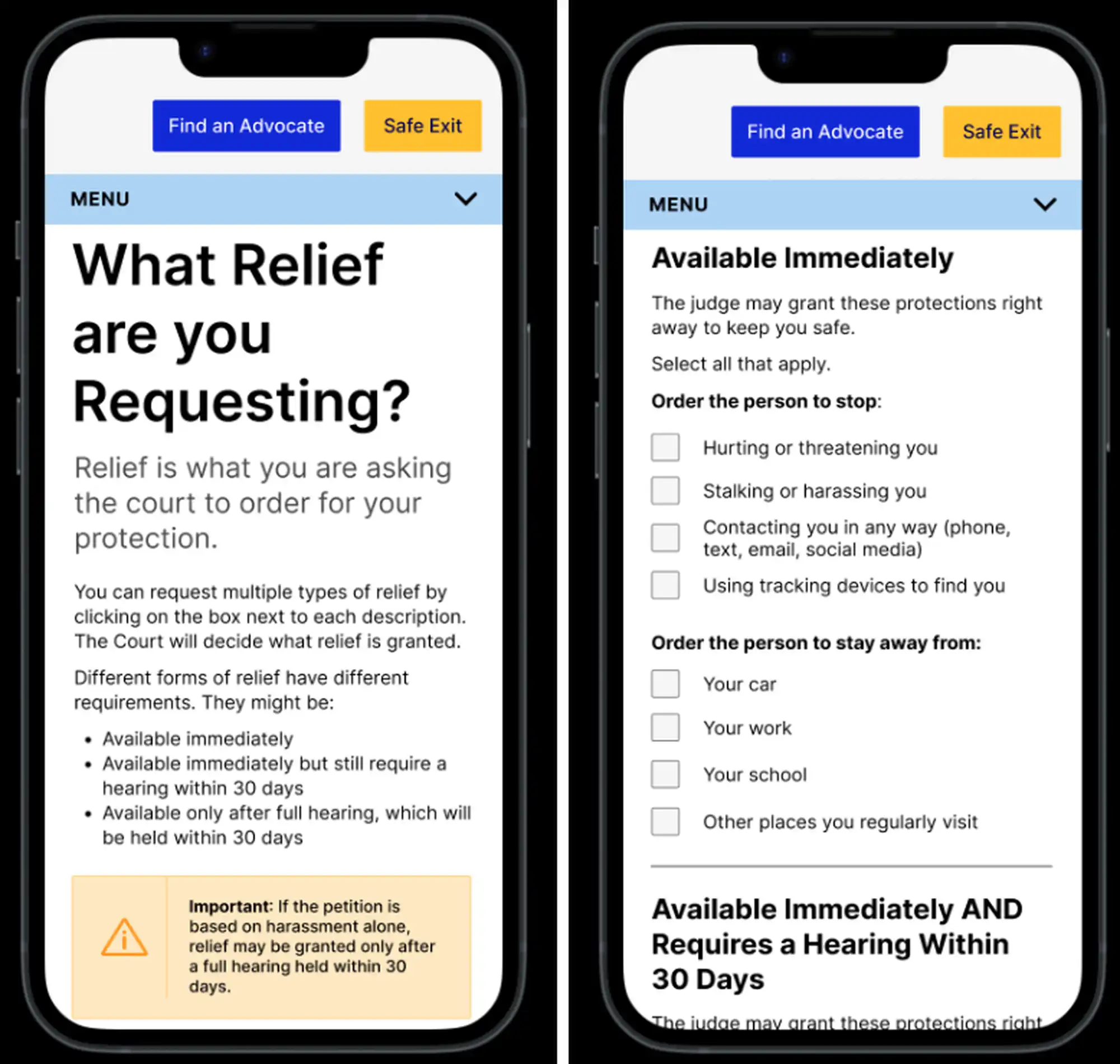
A plain-language explanation of “relief” appears at the top of the page before any selections are required, with clearer guidance on options.
Redesigning the Overall Filing Experience
As part of the prototype design, the team reconsidered the sequence and structure of the filing process. The redesigned user flow sought to reduce unnecessary questions, provide relevant guidance at the point of decision, and organize the process into clearer, more manageable steps. The comparison below illustrates how the proposed experience differs from the existing portal, including changes to the sequence of questions and the pathways available to petitioners.
Existing CPO Portal User Flow
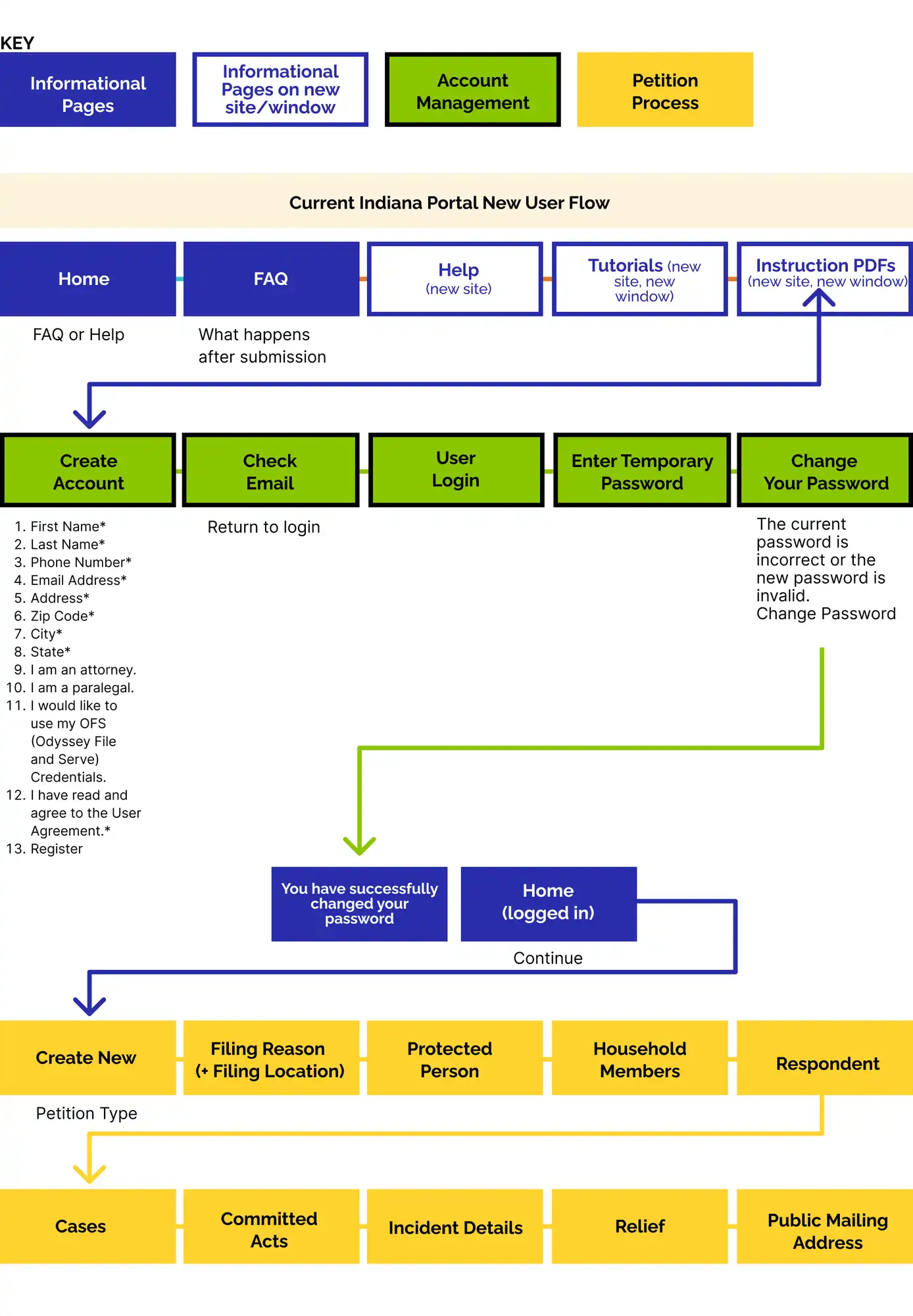
Recommended CPO Portal User Flow
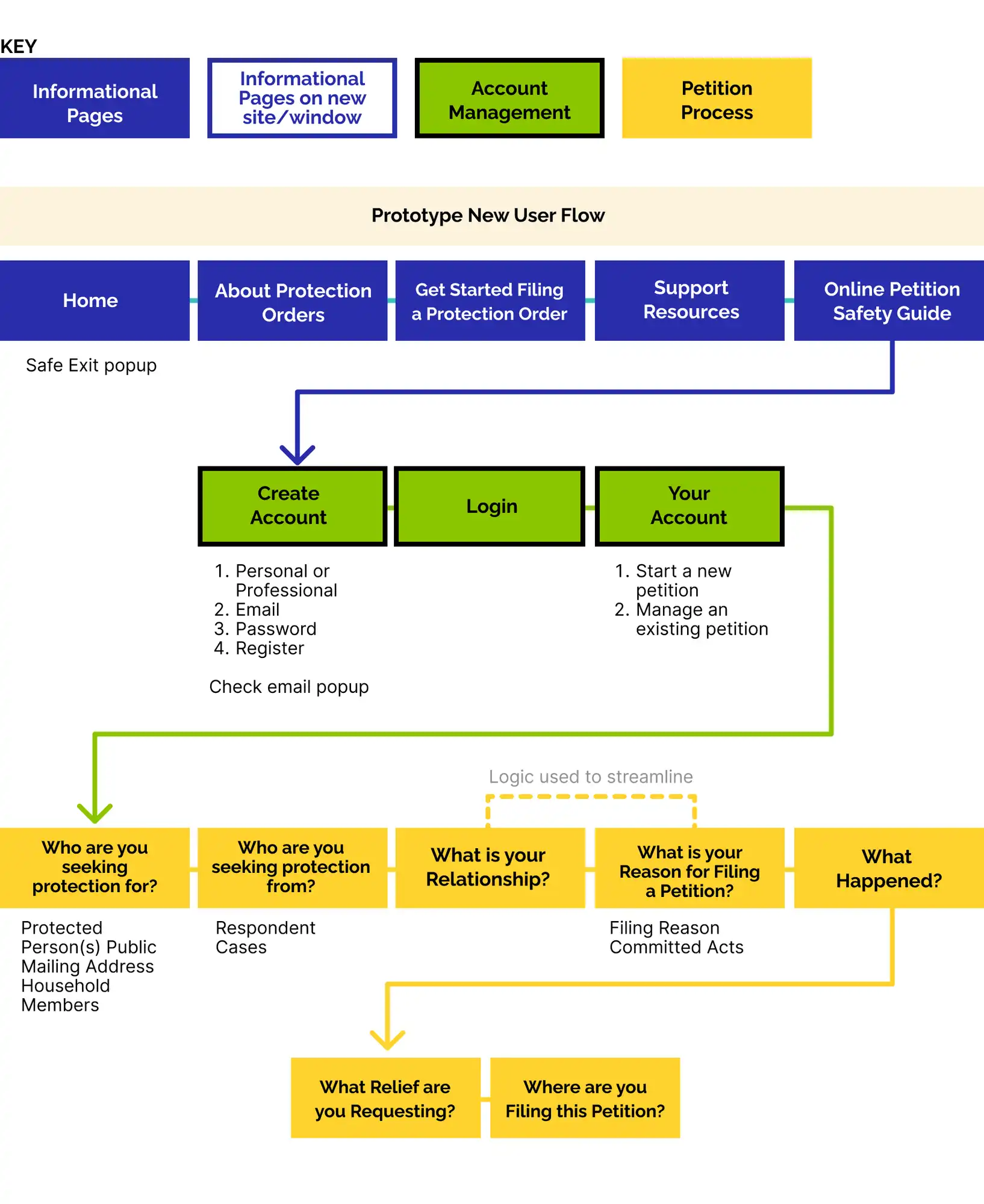
Figure 8: Redesigning the Overall Filing Experience
Comparison of the existing Indiana CPO portal user flow (left) and the recommended user flow (right) developed through the evaluation and iterative design process.
Designated as a foundational research project, we aimed to explore the use of interactive design in the context of “legal” – how does a system have to be designed to provide a broader audience with access to law? Eight preliminary design principles emerged from our work:
What Changed in the Prototype
Across three rounds of usability testing, participants completed several activities more successfully and reported greater ease of use with the redesigned prototypes. These improvements were observed among domestic violence advocates and attorneys serving as proxy participants. They demonstrate the potential of the redesigned interface under testing conditions, not the outcomes of a live system used by petitioners.
| Task Success | Ease | |||||
| Tested Task | Existing Portal | Prototype 1 | Prototype 2 | Existing Portal | Prototype 1 | Prototype 2 |
| Understand portal safety features | 4/5 | 5/8 | 7/7 | 5.4/7 | 5.5/7 | 6.3/7 |
| Locate legal definitions and help resources | 0/5 | 5/8 | 7/7 | 2.5/7 | 5.3/7 | 6.3/7 |
| Register or begin a petition | 4/5 | 8/8 | 7/7 | 3.2/7 | 6.0/7 | 6.3/7 |
| Explain incident documentation instructions | 5/5 | 8/8 | 7/7 | 4.4/7 | 6.4/7 | 6.4/7 |
| Select requested relief | 1/5 | 5/8 | 5/7 | 3.8/7 | 6.4/7 | 6.2/7 |
| Choose an appropriate filing county | 4/5 | 8/8 | 6/7 | 4.3/7 | 6.4/7 | 5.0/7 |
| Task success is the number of participants completing the assigned activity. Ease scores are averages on a 1–7 scale, where 7 means very easy. Initial n=5; Prototype 1 n=8; Prototype 2 n=7. The testing rounds used different groups of participants and interfaces were refined between rounds. Task-success counts and ease-of-use ratings are descriptive results and should not be interpreted as statistically established causal effects. | ||||||
The results show several patterns. By the second prototype round, all seven participants completed the safety, help-resource, registration, and incident-documentation activities, and the requested-relief and filing-location findings were improved. However, filing-location success and requested relief ratings declined between Prototype 1 and Prototype 2, even as qualitative feedback indicated that participants found the language clearer. This illustrates why iterative evaluation must consider qualitative observations alongside numerical results. Incident documentation offers a different lesson. Task completion was already high in initial testing, but ease ratings improved with the prototype. The findings therefore support evaluating both whether users can complete a task and how difficult they perceive it to be.
Confidence, Perceived Independence, and Trauma-Informed Design
The evaluation also asked participants about their confidence and perceptions of the portal’s suitability for survivors.
| Measure | Existing Portal | Prototype 1 | Prototype 2 |
| Advocates’ and attorneys’ confidence in assisting a survivor | 6.6/7 | 6.8/7 | 6.5/7 |
| Perceived ability of survivors to file independently | 3.8/7 | 5.8/7 | 5.8/7 |
| Perceived trauma-informed quality | 2.6/7 | 5.8/7 | 5.8/7 |
Professional participants’ confidence in their own ability to assist survivors remained high throughout testing. Their assessments of survivors’ likely ability to file independently and of the portal’s trauma-informed quality increased in the prototype rounds.
These findings are encouraging but limited. They represent professional judgments, not direct measurements of survivor confidence, independent filing success, trauma responses, or safety. Further research with survivors is necessary to understand whether the redesigned experience produces similar results in practice.
From Prototype Findings to Implementation
The i4J team delivered a comprehensive UX evaluation report with design recommendations, and an interactive prototype to the Indiana courts. The team also strongly recommended additional testing with survivors and self-represented court users to determine whether the improvements observed among proxy participants extend to self-represented litigants navigating the filing process firsthand. Accessibility evaluation, including testing with people who use assistive technologies, was also identified as a priority before implementation.
The evaluation further recommended an ongoing process of collaborative inquiry and iterative improvement. This would allow the courts to assess how the portal performs as user needs, legal requirements, and technology evolve. Suggested potential measures for post-implementation evaluation include petition completeness, filing errors, procedural delays, requests for assistance, and petitioners’ perceptions of safety.
The project’s contribution extends beyond Indiana’s interface changes. The barriers documented in this project are not unique to this state; they are characteristic of court technology designed around legal processes. While there is an inherent complexity to legal requirements, barriers should not arise from how those requirements are communicated and translated into digital interactions. This project demonstrates how systematic, human-centered evaluation can reveal and address barriers that technical review alone may overlook.
By combining the perspectives of court personnel, advocates, attorneys, and design researchers, the Indiana evaluation identified opportunities to make protection order filing clearer, more navigable, and more responsive to the needs of petitioners. The findings demonstrate improvements in several prototype usability measures while underscoring the need for direct survivor participation in future prototypes and in the ongoing evaluation of real-world outcomes.
▶ Key Insight: Human-centered evaluation and iterative design can help courts identify and address barriers in digital legal processes without contributing to retraumatization by working with system actors and proxy participants to create a more trauma-informed prototype. Establishing whether those changes improve access to justice requires further testing with affected users and ongoing feedback and measurement after implementation.
Acknowledgments
This project was made possible through partnership with the National Center for State Courts and the Indiana Courts. The authors acknowledge the Innovation for Justice faculty, staff, and UX4Justice students who planned and conducted the evaluation, as well as the system actors, advocates, attorneys, and subject matter experts who contributed to the research and design reviews. The authors thank the U.S. Department of Justice’s Office on Violence Against Women for supporting this project. A full list of contributors appears in the final report.
For more information about this project, the full report, and the design guidance this project informed, visit: innovation4justice.org/portal-design.
Download this use case now.
Call for Submissions!
Submit your Legal Design story until June 30, 2026.
Next Issue of the LDJ
We are receiving submissions for Vol. 3 of the Journal!

Do you want to share your Legal Design Story with the world?
Everyone can submit a use case for review by our expert team.
Here’s how.
How does it work?
We are looking for different kinds of use cases out of different phases of a legal design process.
This part of the Journal will showcase the best work and developments in legal design. This can be in the form of text, digital artifacts, reports, visualisations or any other media that we can distribute in a digital journal format. Text submissions can be between 1,000 and 5,000 words and are reviewed by our Studio editorial team.
What kind of practical use cases can I submit?
We are looking for Prototypes or implemented solutions of legal design use cases.
Your submission should consist the following:
Your submission should consist the following:
- Challenge: Describe the problem you had to solve
- Approach: Describe the selected design process and phases you went through in order to solve the challenge. Please insert also a section of the impact that your concept will bring or brought.
- Solution: Show us the solution you developed. Not only with words but with images.
Make sure you do have permission and the rights to share your project an materials (such as images and use case stories etc.)
Why is there a review process?
Our goal is to show high quality legal design cases for others to learn from.
How does the review process look like and how do we select use cases for publication ?
We are looking for Prototypes or implemented solutions that will be reviewed by the following criteria:
- Aesthetics
- Depth of concept (Why, What, How)
- Process steps you selected
- Impact
Do you want to share your Legal Design Story with the world?
What are the requirements for submission?
Please find a list of requirements and tips here.
Why publish with us?
Reputation
The editorial teams are comprised of many of the leading legal design academics and practitioners from around the world.
Diamond open access
We are a diamond open-access journal, digital and completely free to readers, authors and their institutions. We charge no processing fees for authors or institutions. The journal uses a Creative Commons BY 4.0 licence.
Rigour and quality
We are using double blind peer review for Articles and editorial review for the Studio. Articles are hosted on Scholastica which is optimised for search and integration with academic indices, Google Scholar etc.
Your Studio Editorial Collective
Do you want to see more use cases ? Take a look at the websites of some of our Studio editorial team.


AI Usage & Disclosure Policy
Please take note of our AI Usage & Disclosure Policy***